
ImagiPass1.0.0.1 - Download
You'll be able to download in few seconds.
Publisher Description
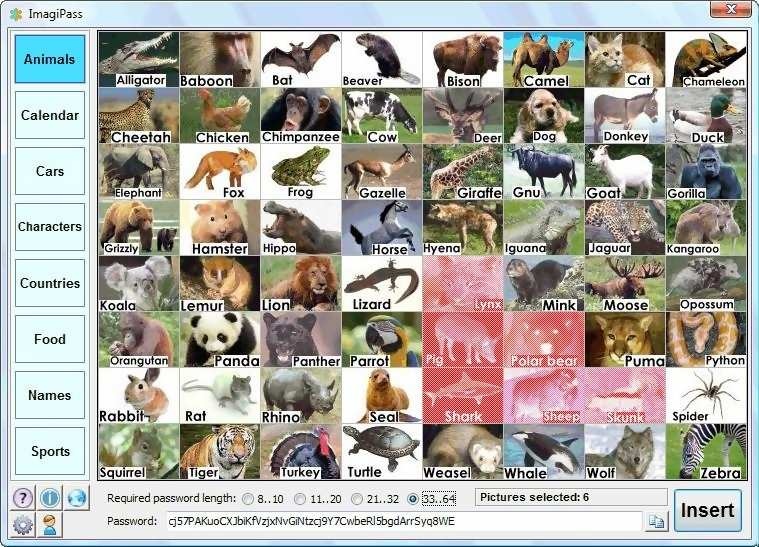
Most of us have important passwords that we would never want to forget, or outsiders to know. Just imagine what could happen if anybody gained access to confidential documents of your company. Or if they got hold of the password to your highly private email box. Or if the password to your bank account fell into the hands of hackers. You obviously want to make sure that such a misadventure never happens to you. Crucial passwords need to be stored and managed in a maximally secure way.
First, you must realize that your passwords are never really safe if they are stored on a hard disk or some other physical device, or worse, on any scrap of paper. If you can retrieve passwords from your PC, other people might retrieve them too. Now you might decide to store your passwords safely in your head. There is just one big snag to that method. If your passwords are too long or too complex, you might find it difficult to memorize and recall them. If your passwords are too simple, ordinary people might easily guess them right, or hackers crack them within seconds. And there is one last hurdle you have to clear. Even if you can remember long secure passwords, you might very well mistype them when you enter them manually.
This is where ImagiPass comes in.
ImagiPass is hacker and cracker-proof. How can this be? Simply because ImagiPass will never actually store your passwords at all! You will store foolproof picture mnemonics in your own head! ImagiPass will only recompute the original passwords from the custom combination of pictures that you used to create the passwords in the first place. And to cap it all, ImagiPass will also automatically enter the passwords for you, - typo-free passwords, of course!
So with the help of ImagiPass, you will effortlessly create, recall and enter long and secure passwords. You will only have to remember custom combinations of pictures.
About ImagiPass
This Password Managers program is available in English. It was last updated on 29 September, 2026. ImagiPass is compatible with the following operating systems: Windows.
The company that develops ImagiPass is The Atlantis Word Processor Team. The latest version released by its developer is 1.0.0.1.
The download we have available for ImagiPass has a file size of 1.0 MB. Just click the green Download button above to start the downloading process. The program is listed on our website since 2011-11-08 and was downloaded 0 times. We have already checked if the download link is safe, however for your own protection we recommend that you scan the downloaded software with your antivirus. Your antivirus may detect the ImagiPass as malware if the download link is broken.
How to install ImagiPass on your Windows device:
- Click on the Download button on our website. This will start the download from the website of the developer.
- Once the ImagiPass is downloaded click on it to start the setup process (assuming you are on a desktop computer).
- When the installation is finished you should be able to see and run the program.
Program Details
System requirements
Download information
Pricing
Version History
version 1.0.0.1
posted on 2011-11-08
Disclaimer
External Download
We do not host ImagiPass on our servers. We did not scan it for viruses, adware, spyware or other type of malware. This app is hosted by the software publisher and passed their terms and conditions to be listed there. We recommend caution when installing it.
The external download link for ImagiPass is provided to you by apps112.com without any warranties, representations or guarantees of any kind, so access it at your own risk.
If you have questions regarding this particular app contact the publisher directly. For questions about the functionalities of apps112.com contact us.
